前言
笔者一直使用 wireguard + phantun 进行家 -> 公司 -> 香港某CN2GIA小鸡的异地组网方案,家里是上海电信,有公网 IP,之前一直使用这套方案打通三地的网络,一直稳定使用,但今年开年电信做活动,趁此机会更换了电信 1000M/100M 的家宽,于此同时还能保留公网IP (其实是打 10000 号索要的🤣),这 1000M 的下行其实我并不是很感冒,因为原来 200M 的下行我也觉得够用了,但是 100M 的上行可就不一样了,我原来就苦于家里上行只有区区 30M 而无法好好的访问家里的媒体服务,像是 jellyfin 或者是 moonlight 串流的体验都很差,看片都是马赛克画质还动不动转圈,我心想有了这 100M 上传不得起飞?
然而事与愿违,在获取到公网 IP 之后我就开始使用 iperf3 来测试公司和家里的网络吞吐情况。
网络情况
公司是联通 100M 对等商业宽带,但显然办公室那么多人不可能跑满,实际上IT给每个客户端做了 5M 下行的限速,不过好在内网的服务器限速被放宽到了 20M。而香港 CN2GIA 的小鸡是一个跨境网络情况尚可的 VPS, 实测上海电信高峰期可以联机「喷射战士」不丢包,网络是 1Gbps 上下对等,不过我使用的协议在家测速的时候达不到千兆,只有 500M 左右的下行,可能是使用 tun 模式性能损耗太大的锅,不过这是题外话了,所以这三个节点的网络情况如下:
| 项目 | 公司 | 家 | 香港VPS |
|---|---|---|---|
| 可用带宽 | 20M/20M | 1000M/100M | 1G /1G |
| vpn协议 | wireguard | wireguard | wireguard |
| udp流量转tcp | phantun | phantun | phantun |
家中openwrt 开启 iperf3 服务
iperf3 -s
公司电脑分别测上传和下载
➜  ~ iperf3 -c 192.168.7.1
Connecting to host 192.168.7.1, port 5201
[  5] local 10.1.1.63 port 50378 connected to 192.168.7.1 port 5201
[ ID] Interval           Transfer     Bitrate         Retr  Cwnd
[  5]   0.00-1.00   sec  2.38 MBytes  19.9 Mbits/sec    1    151 KBytes
[  5]   1.00-2.00   sec  2.25 MBytes  18.9 Mbits/sec    0    162 KBytes
[  5]   2.00-3.00   sec  2.12 MBytes  17.8 Mbits/sec    1    170 KBytes
[  5]   3.00-4.00   sec  2.25 MBytes  18.9 Mbits/sec    0    179 KBytes
[  5]   4.00-5.00   sec  2.12 MBytes  17.8 Mbits/sec    0    187 KBytes
[  5]   5.00-6.00   sec  2.25 MBytes  18.9 Mbits/sec    0    195 KBytes
[  5]   6.00-7.00   sec  2.25 MBytes  18.9 Mbits/sec    0    217 KBytes
[  5]   7.00-8.00   sec  2.12 MBytes  17.8 Mbits/sec    0    258 KBytes
[  5]   8.00-9.00   sec  2.38 MBytes  19.9 Mbits/sec    0    317 KBytes
[  5]   9.00-10.00  sec  2.12 MBytes  17.8 Mbits/sec    1    384 KBytes
- - - - - - - - - - - - - - - - - - - - - - - - -
[ ID] Interval           Transfer     Bitrate         Retr
[  5]   0.00-10.00  sec  22.2 MBytes  18.7 Mbits/sec    3            sender
[  5]   0.00-10.18  sec  21.9 MBytes  18.0 Mbits/sec                  receiver

iperf Done.

➜  ~ iperf3 -c 192.168.7.1 -R
Connecting to host 192.168.7.1, port 5201
Reverse mode, remote host 192.168.7.1 is sending
[  5] local 10.1.1.63 port 59656 connected to 192.168.7.1 port 5201
[ ID] Interval           Transfer     Bitrate
[  5]   0.00-1.00   sec  1.62 MBytes  13.6 Mbits/sec
[  5]   1.00-2.00   sec  1.00 MBytes  8.39 Mbits/sec
[  5]   2.00-3.00   sec  1.12 MBytes  9.43 Mbits/sec
[  5]   3.00-4.00   sec  1.00 MBytes  8.40 Mbits/sec
[  5]   4.00-5.00   sec  1.12 MBytes  9.44 Mbits/sec
[  5]   5.00-6.00   sec  1.00 MBytes  8.39 Mbits/sec
[  5]   6.00-7.00   sec  1.12 MBytes  9.44 Mbits/sec
[  5]   7.00-8.00   sec  1.12 MBytes  9.43 Mbits/sec
[  5]   8.00-9.00   sec  1.00 MBytes  8.39 Mbits/sec
[  5]   9.00-10.00  sec  1.00 MBytes  8.39 Mbits/sec
- - - - - - - - - - - - - - - - - - - - - - - - -
[ ID] Interval           Transfer     Bitrate         Retr
[  5]   0.00-10.01  sec  11.2 MBytes  9.43 Mbits/sec  849            sender
[  5]   0.00-10.00  sec  11.1 MBytes  9.33 Mbits/sec                  receiver

iperf Done.
➜  ~
可以看出这套 wireguard + phantun 上传可以跑满公司的上传带宽,但是下载却只有可怜的10M 左右,控制变量,我们在香港 VPS 同样测一下:
➜  ~ iperf3 -c 192.168.7.1
Connecting to host 192.168.7.1, port 5201
[  5] local 192.168.7.11 port 49844 connected to 192.168.7.1 port 5201
[ ID] Interval           Transfer     Bitrate         Retr  Cwnd
[  5]   0.00-1.00   sec  4.33 MBytes  36.3 Mbits/sec    0    323 KBytes
[  5]   1.00-2.00   sec  4.59 MBytes  38.5 Mbits/sec    0    537 KBytes
[  5]   2.00-3.00   sec  5.21 MBytes  43.7 Mbits/sec    0    753 KBytes
[  5]   3.00-4.00   sec  5.03 MBytes  42.2 Mbits/sec    0    975 KBytes
[  5]   4.00-5.00   sec  4.93 MBytes  41.4 Mbits/sec    0   1.19 MBytes
[  5]   5.00-6.00   sec  5.00 MBytes  41.9 Mbits/sec    0   1.43 MBytes
[  5]   6.00-7.00   sec  5.00 MBytes  41.9 Mbits/sec    0   1.69 MBytes
[  5]   7.00-8.00   sec  5.00 MBytes  41.9 Mbits/sec    0   1.96 MBytes
[  5]   8.00-9.00   sec  5.00 MBytes  41.9 Mbits/sec    0   2.20 MBytes
[  5]   9.00-10.00  sec  5.00 MBytes  41.9 Mbits/sec    0   2.43 MBytes
- - - - - - - - - - - - - - - - - - - - - - - - -
[ ID] Interval           Transfer     Bitrate         Retr
[  5]   0.00-10.00  sec  49.1 MBytes  41.2 Mbits/sec    0             sender
[  5]   0.00-10.52  sec  48.0 MBytes  38.3 Mbits/sec                  receiver

iperf Done.
➜  ~ iperf3 -c 192.168.7.1 -R
Connecting to host 192.168.7.1, port 5201
Reverse mode, remote host 192.168.7.1 is sending
[  5] local 192.168.7.11 port 49496 connected to 192.168.7.1 port 5201
[ ID] Interval           Transfer     Bitrate
[  5]   0.00-1.20   sec   768 KBytes  5.26 Mbits/sec
[  5]   1.20-2.18   sec   640 KBytes  5.32 Mbits/sec
[  5]   2.18-3.04   sec   256 KBytes  2.45 Mbits/sec
[  5]   3.04-4.08   sec  1.00 MBytes  8.07 Mbits/sec
[  5]   4.08-5.07   sec   512 KBytes  4.23 Mbits/sec
[  5]   5.07-6.26   sec   640 KBytes  4.42 Mbits/sec
[  5]   6.26-7.22   sec   512 KBytes  4.33 Mbits/sec
[  5]   7.22-8.15   sec   512 KBytes  4.51 Mbits/sec
[  5]   8.15-9.13   sec   512 KBytes  4.30 Mbits/sec
[  5]   9.13-10.45  sec   512 KBytes  3.17 Mbits/sec
- - - - - - - - - - - - - - - - - - - - - - - - -
[ ID] Interval           Transfer     Bitrate         Retr
[  5]   0.00-10.49  sec  5.88 MBytes  4.70 Mbits/sec  807             sender
[  5]   0.00-10.45  sec  5.75 MBytes  4.61 Mbits/sec                  receiver

iperf Done.
➜  ~
可以看出我们这个回程的路由还是可以的哈,带宽能跑到42M 左右,但同样的问题,家宽上传更是 10M 的一半都不到了,看到这个数据我只能怀疑是家里的设备出了问题。
有事找 AI
AI 时代折腾的方式也变了,以前遇到这种情况第一时间谷歌全网爬楼,中文的英文的资料找一大推,有时候还遇到恶心的CSDN,一堆垃圾内容和标题党,当然也有很优质的内容,不过占比很少就是了。ChatGPT 出现之后这种局面变了,遇到事情首先问AI,一个AI不行再换一个,大大节省了爬楼的时间,但是也有缺点,现在 AI 的知识面太广,遇到问题一下给好几个方案,其中还包含一些幻觉方案,比如一个不存在的 Git 仓库,它可以信誓旦旦的给你快速开始的教程,等你真正 clone 的时候傻眼了,404 NOT FOUND。
这次我开始问的是Gemini,也是我日常主力 AI 助手,他看了数据之后首先建议我改 MTU, MTU 我之前组网的时候就调过了,因为是 phantun faketcp 转的udp,在原数据包的基础上要增加 16 字节,所以那时的 MTU 设置为 1400 了,难道是换了宽带时候运营商做了什么动作导致 MTU 增加了?我将信将疑的改成了1300,再次运行测试:
- 公司电脑
╰─❯ iperf3 -c 192.168.7.1
❯ iperf3 -c 192.168.7.1
Connecting to host 192.168.7.1, port 5201
[  5] local 192.168.7.5 port 34986 connected to 192.168.7.1 port 5201
[ ID] Interval           Transfer     Bitrate         Retr  Cwnd
[  5]   0.00-1.00   sec  2.52 MBytes  21.2 Mbits/sec    1    132 KBytes
[  5]   1.00-2.00   sec  2.04 MBytes  17.1 Mbits/sec    0    143 KBytes
[  5]   2.00-3.00   sec  2.23 MBytes  18.7 Mbits/sec    0    151 KBytes
[  5]   3.00-4.00   sec  2.23 MBytes  18.7 Mbits/sec    0    161 KBytes
[  5]   4.00-5.00   sec  2.23 MBytes  18.7 Mbits/sec    0    171 KBytes
[  5]   5.00-6.00   sec  2.10 MBytes  17.7 Mbits/sec    6    140 KBytes
[  5]   6.00-7.00   sec  2.23 MBytes  18.7 Mbits/sec    0    163 KBytes
[  5]   7.00-8.00   sec  1.98 MBytes  16.6 Mbits/sec    0    178 KBytes
[  5]   8.00-9.00   sec  2.23 MBytes  18.7 Mbits/sec    0    183 KBytes
[  5]   9.00-10.00  sec  2.23 MBytes  18.7 Mbits/sec    0    184 KBytes
- - - - - - - - - - - - - - - - - - - - - - - - -
[ ID] Interval           Transfer     Bitrate         Retr
[  5]   0.00-10.00  sec  22.0 MBytes  18.5 Mbits/sec    7             sender
[  5]   0.00-10.08  sec  21.6 MBytes  18.0 Mbits/sec                  receiver

iperf Done.
❯ iperf3 -c 192.168.7.1 -R
Connecting to host 192.168.7.1, port 5201
Reverse mode, remote host 192.168.7.1 is sending
[  5] local 192.168.7.5 port 41730 connected to 192.168.7.1 port 5201
[ ID] Interval           Transfer     Bitrate
[  5]   0.00-1.07   sec  2.25 MBytes  17.6 Mbits/sec
[  5]   1.07-2.08   sec  1.12 MBytes  9.32 Mbits/sec
[  5]   2.08-3.04   sec  1.00 MBytes  8.74 Mbits/sec
[  5]   3.04-4.08   sec  1.12 MBytes  9.07 Mbits/sec
[  5]   4.08-5.02   sec  1.00 MBytes  8.97 Mbits/sec
[  5]   5.02-6.08   sec  1.12 MBytes  8.93 Mbits/sec
[  5]   6.08-7.03   sec  1.00 MBytes  8.80 Mbits/sec
[  5]   7.03-8.03   sec  1.00 MBytes  8.40 Mbits/sec
[  5]   8.03-9.07   sec  1.00 MBytes  8.05 Mbits/sec
[  5]   9.07-10.03  sec  1.00 MBytes  8.72 Mbits/sec
- - - - - - - - - - - - - - - - - - - - - - - - -
[ ID] Interval           Transfer     Bitrate         Retr
[  5]   0.00-10.04  sec  11.8 MBytes  9.82 Mbits/sec  842             sender
[  5]   0.00-10.03  sec  11.6 MBytes  9.72 Mbits/sec                  receiver

iperf Done.
好吧,上传下载都没变。于是我又问了 Claude,结果这家伙说我光改 wireguard 的 MTU 没用,也得把 Phantun 的 MTU 也改了,还说的斩钉截铁,让我一度充满希望,甚至内心还想:到底是最强的AI,结果打脸来的非常之快,改了之后网络直接疯狂丢包,带宽断崖式下跌,又让我想起来 Claude 上次还弄坏了我的 Archlinux,让我修了好久。
所以还是退回 Gemini 吧,Gemini 指出了一个值得关注的现象:
[ 5] 0.00-1.07 sec 2.25 MBytes 17.6 Mbits/sec
家里上传的第一秒是接近公司电脑可用带宽的,但是在第二秒就下跌将近 50%,而且重传竟然高达 842。
将这个发现和 AI 探讨了之后 AI 提出了一个非常棘手的情况:运营商限速, 简单来说就是运营商虽然给到了 100M 的上传,可是这 100M 你是很难跑满的,近年来运营商为了打击 PCDN 和 BT 下载引入了一些技术,其中就有一项技术:
- DPI 深度识别技术
他能识别一些异常的流量,比如 BT 下载和 PCDN 等,一旦发现这些异常流量则限速到 10M,像 phantun 等伪装工具的流量特征甚至还要限制的更低,所以就解释了为什么第一秒能达到公司电脑最大带宽,而后就被稳稳的限速到 10M ,以及大量的重传。
Gemini 还提出了一个验证的方法,就是通过家里公网吧 iperf3 的测速端口暴露出来,测试一下裸连的速度:
Server listening on 5201 (test #287)
-----------------------------------------------------------
Accepted connection from 112.*.*.145, port 2073
[  5] local 192.168.5.99 port 5201 connected to 112.*.*.15 port 2074
[ ID] Interval           Transfer     Bitrate         Retr  Cwnd
[  5]   0.00-1.00   sec  1.50 MBytes  12.6 Mbits/sec  511   20.9 KBytes
[  5]   1.00-2.00   sec   384 KBytes  3.15 Mbits/sec  115   18.6 KBytes
[  5]   2.00-3.00   sec   640 KBytes  5.24 Mbits/sec   25   20.9 KBytes
[  5]   3.00-4.00   sec   640 KBytes  5.24 Mbits/sec   72   20.9 KBytes
[  5]   4.00-5.00   sec   512 KBytes  4.19 Mbits/sec   15   27.8 KBytes
[  5]   5.00-6.00   sec   640 KBytes  5.24 Mbits/sec   55   3.48 KBytes
[  5]   6.00-7.00   sec   512 KBytes  4.19 Mbits/sec   41   18.6 KBytes
[  5]   7.00-8.00   sec   640 KBytes  5.24 Mbits/sec   17   18.6 KBytes
[  5]   8.00-9.00   sec   512 KBytes  4.19 Mbits/sec   73   20.9 KBytes
[  5]   9.00-10.00  sec   640 KBytes  5.24 Mbits/sec   15   27.8 KBytes
- - - - - - - - - - - - - - - - - - - - - - - - -
[ ID] Interval           Transfer     Bitrate         Retr
[  5]   0.00-10.01  sec  6.50 MBytes  5.45 Mbits/sec  943             sender
-----------------------------------------------------------
Server listening on 5201 (test #288)
-------------------------------------------
这个数据是我后面测试的,有一次我成功的裸连测出来了 100M 满速上传的数据,只是没来的及截图,之后就再也测不出来了,而且还有更离谱的,我用境外香港的服务器测了几次之后,运营商直接阻断了家里 IP 和 VPS 小鸡的连接,表现为 ssh 登录不上, wireguard 也断联,但是公司的机器能正常 ssh 到 VPS,所幸只是阻断了几分钟。
所以还是被限速了
我还是不相信被限速了,所以还试了 wstunnel 伪装 tcp、easytier 组网工具,结果无一例外都是同样的结果,我还想起我这条宽带曾经跑过京东云的无线宝,当时因为上传流量太大被电信的人上门递了一张整改单,至此我的情况就很清晰了:
运营商大概率启用了 DPI 深度识别技术对上传的带宽做了限速,识别到的 PCDN 、BT 下载一类的流量直接限速 10M ,可疑的流量直接限速 5M ,如果是跨境的上传更是直接阻断,只对一些常见的测速网站开绿灯,好让用户看他的宽带还是能达到应有的速度的。
有解吗?
老实说我甚至觉得运营商是一刀切或者白名单只给少数几个测速网站开绿灯了,因为我试了国际的 speedtest 也是不多不少 10M 的上传:
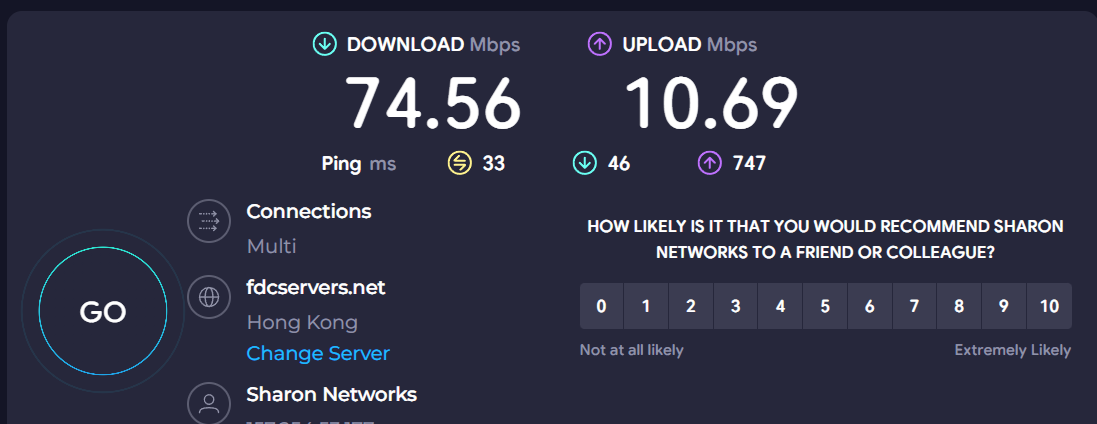
对于这种情况任何的伪装都是徒劳的,要么换宽带,要么去投诉看看有没有用了,总之生在天国,网络能力可能是全世界最强的了,只能等等社区大神有没有什么解决方案了。